
Essential ESM Platform Tools for Scaling the Service Approach Company-Wide
2 December 2025
updated at: 2 December 2025
Modern businesses are facing a tough challenge: how do you get dozens of different departments — from IT to accounting — to work in sync? How do you make sure every team isn't just ticking off tasks, but actually creating value for their colleagues and customers? The answer lies in Enterprise Service Management (ESM). It's an approach that transforms a company's internal processes into genuine services, where employees are treated as "consumers" and departments as "service providers."
«This isn't just about new software; it's a mindset shift. As the Director of Business Products at SimpleOne put it, "If we can bring different service providers onto a single ESM platform and seamlessly link them into a shared value creation system, we can drive a real, positive change in how people think and work. We can move away from 'silo thinking' — where everyone just cares about their own department — and stop using shadow IT tools. Instead, we can start providing integrated, high-quality services that are truly focused on the customer within the organization.»Andrey Vishnyakov Director of Business Products
But to successfully scale ESM across your whole organization, you need more than just a new philosophy. You need a comprehensive toolkit to automate processes, smooth out the interaction between departments, and boost the quality of the services you provide.
What is the Service-Based Approach?
Before we dive into the tools, let's get the basics straight. Here are a few key definitions:
Service Management is a set of specialized organizational capabilities for delivering value to customers in the form of services.
Services are provided by an organization — which is a person or a group of people with specific functions, responsibilities, and relationships — to achieve its goals.

The main goal of any organization is to create value for customers and, in doing so, make a profit. But as we mentioned, customers aren't always external; they can be internal too. To provide high-quality services to your own employees, you use the ESM service approach. This shifts the focus from just "managing a process" to "creating value" through the relationship between the customer and the service provider.
Enterprise Service Management (ESM) is simply taking the principles and capabilities of ITSM (IT Service Management) and applying them outside of IT, to other parts of the business. The goal is to improve operational efficiency by providing high-quality corporate services to the company's own employees.
It's important to note that the way you apply this approach might look different depending on what a department does.
- An IT department usually deals with very specific processes, like incident and problem management. This is due to the technical nature of their work and the need to quickly respond to failures in the IT infrastructure and maintain the availability of services.
- Other departments, like HR or finance, might use more basic service management processes. Their tasks are often more standardized, like processing a vacation request or a compensation claim. For them, basic tools for managing service requests and tasks are often enough.
However, the key principle of ESM stays the same for everyone: focus on creating value for the service consumer and improving the efficiency of the organization as a whole. No matter what processes they use, every department wants to optimize its work and deliver better service.
These are the principles that drove the development of SimpleOne. Its architecture was specifically designed to support and deploy this service-based approach across an entire organization.
Where the ESM Platform Fits in the SimpleOne Architecture
SimpleOne was built from day one as a Low-code platform with a wide range of ready-made service tools. This approach allows clients and partners to build and modify solutions on their own, without needing to call in the vendor for every little change.
Level One: The Low-code Application Platform (LCAP). This is the foundation of the system, packed with modern development tools.
Level Two: The ESM Platform. This is a set of ready-to-use service tools.
Level Three: Business Applications. These are the ready-made solutions built on top of the platform. All applications use the unified infrastructure of the ESM platform and integrate seamlessly with each other, allowing you to create comprehensive solutions for digital transformation.
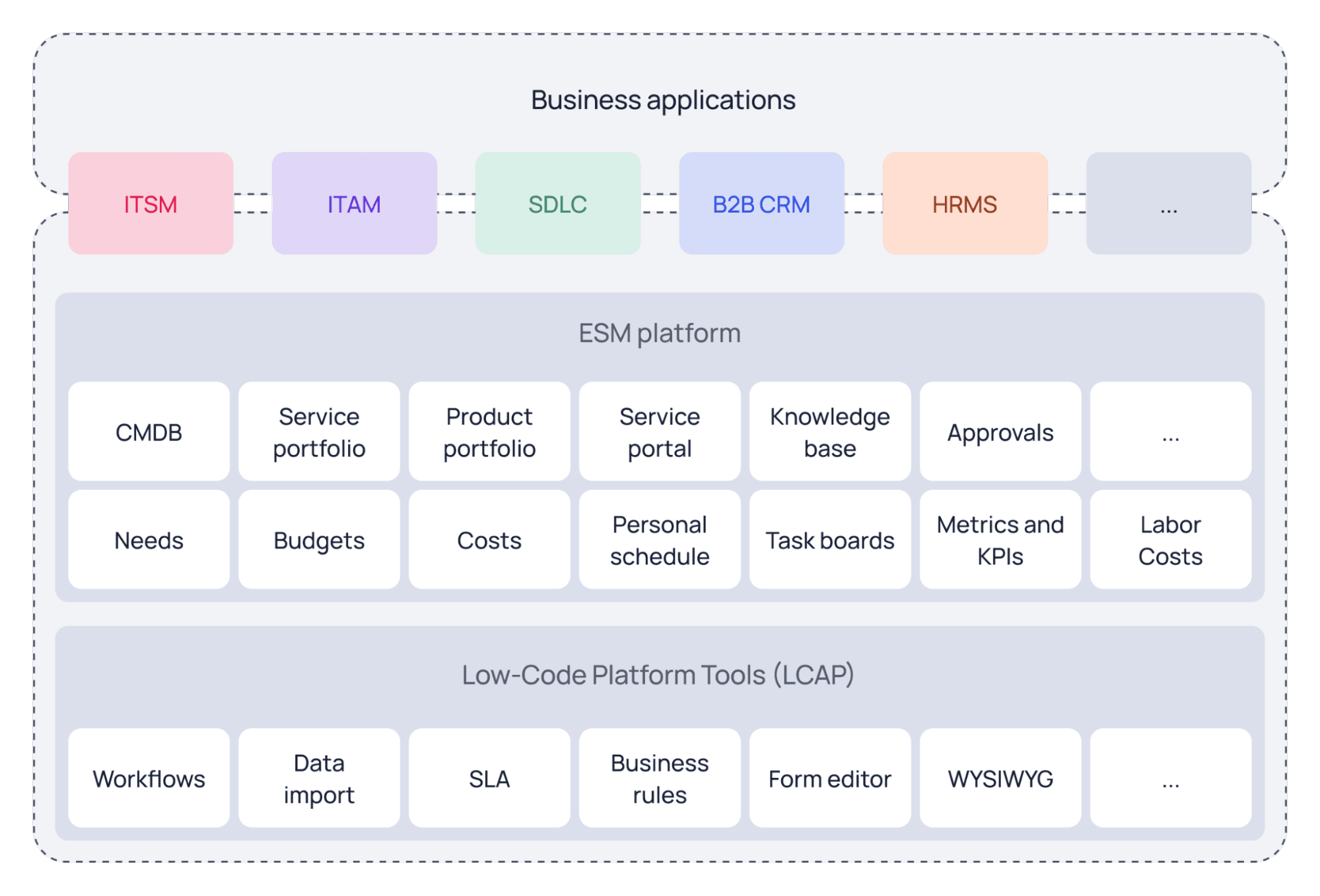
A key feature of SimpleOne is that even if you don't install any specific business applications, the platform already comes with a full set of service tools. Unlike other systems that try to shoehorn existing ITSM, BPM, CRM, or ERP systems into service management tasks, SimpleOne was created and continues to grow as a dedicated service platform.
This isn't just an ITSM system that was stretched to cover HR or Facilities, making the data structure messy and complicated. It's a full-fledged ESM platform where service management, product management, knowledge bases, CMDB, and other tools are core components of that second level. This ensures that service processes are integrated naturally and seamlessly, rather than being artificially forced into an architecture that wasn't built for them.
How the Levels Connect
Every level of the SimpleOne architecture is tightly linked. The ESM platform uses the capabilities of the Low-code level to implement basic service tools. The business applications, in turn, are built on top of these tools, adding functionality specific to different departments.
If a company wants to extend the service approach beyond IT and the ITSM system — for example, to automate HR — it's enough to use the ESM platform tools to integrate the new department, or simply use the ready-made HRMS business application.
This allows for the quick integration of new business units — all the necessary components are already there in the platform, so you don't need to buy extra modules.
Also, as new business applications appear and old ones expand, they constantly bring new capabilities to the platform by adding new components to the shared ESM toolkit.
An example of the interaction between the ESM platform's ready-made service tools and the ITAM business application for IT asset accounting and management.
The Head of Business Solutions Development at SimpleOne explains it well: "When we develop the IT asset management system (ITAM), we use the basic tools of the ESM platform: the CMDB for tracking configuration items, along with platform contracts and needs. On top of this foundation, we add ITAM-specific extensions: asset contracts, asset needs, and asset procurement. ITAM also expands the basic 'task' entity — adding 12 new types of tasks specifically for managing the asset lifecycle.
All applications use the same directories of employees and user groups provided by the platform, as well as a common service portal. This means that once you set up your employees and groups, you can use that data across all SimpleOne applications, including any custom ones you build yourself.
This architecture maximizes efficiency across all processes — data and functionality are available to every application in a single information space, and every new application can enrich the shared tools of the platform."
The Tools Inside the ESM Platform
At the heart of the ESM platform is a set of essential tools that cover every aspect of corporate service management, from building unified service portals to monitoring service quality. Let's look at the key components you need to build a full-fledged service and product management system across your whole organization.
Value Stream Management
The ESM platform is built around one key concept: managing the value stream. This includes every element needed to provide a service, from the products themselves to the processes of interaction with consumers.
Service Management
The foundation of service management is the service provider. This could be an internal department (like IT, HR, or Accounting) or an external partner. Each provider builds their own service portfolio — a structured catalog of the services they offer to consumers.
The Configuration Management Database (CMDB) allows you to keep track of every component needed to deliver a service, from hardware to documents. The CMDB in SimpleOne uses REM (Record Extended Model) technology, which lets you flexibly describe different types (models) of configuration items without creating redundant data structures.
Standard request models are also built on REM technology. They allow you to create templates for requests with specific fields and questions for each type of service — for example, one for ordering new equipment and another for booking a business trip. In ITSM, this would be a set of standard IT services; in HRMS, it would be HR services.
In SimpleOne, all service documentation has a set of specifications, which are divided into external and internal. External service specifications are key for business users and might include Service Level Agreements (SLAs), user-facing descriptions, and request descriptions. Internal specifications are for the IT service owner (the agent) and might include incident models and escalation rules.
Agreements lock in the arrangements between the provider and the consumer: who is providing what to whom, and on what terms.

Product Management
Products are the building blocks of services — they are configurations of organizational resources designed to create value. The product portfolio allows you to structure your product line and manage the lifecycle of each product.
Product modules are the components that make up those products. A modular approach makes it easier to develop new products and modify existing ones.
Satisfaction Management
A survey system allows you to collect feedback from service consumers. This helps you assess the quality of the services provided and spot areas for improvement in a timely manner. Surveys can be conducted for individual services or to measure overall satisfaction with a provider's work.
Service Portals
The service portal is a "single window" for interaction between service customers and the departments providing those services. Through the portal, an internal or external client interacts with the corporate service provider.
Here, you can create service requests, resolve incidents, and find answers to questions. The functionality, structure, and number of portals can be customized to your company's needs and quickly scaled to support different service functions and departments.
SimpleOne’s ESM platform offers powerful capabilities for creating and working with service portals:
- Creation of an unlimited number of portals. You can deploy separate portals for different user groups: internal employees, external clients, or suppliers. Each portal is tailored to specific tasks and organizational policies.
- A knowledge base helps gather and organize information about services, common problems, and their solutions. Users can find answers on their own.
- Flexible approvals allow you to build decision-making paths for tasks and documents. You can configure anything from a simple one-person approval to complex multi-level processes.
- An announcement system keeps users informed about important events, changes in service operation, or maintenance work.
- The user profile holds basic information and settings like interface language and contact details. In specialized solutions (like SimpleOne HRMS), the profile is expanded with extra data like skills, position, and mentor info.

Metrics and KPI Management
Traffic Light Balanced Scorecards is a visual tool for setting goals and monitoring progress based on measurable numbers (KPIs). The system is based on defining specific, measurable goals and critical success factors before you start working with the tool.
Using this tool, you can create a summary table with color-coded status indicators: red, yellow, green. This visual representation lets you quickly assess the quality of work and how close you are to achieving your goals. You can drill down into the data for each KPI to analyze the specific records that went into the calculation.
Resource and Performance Management
This includes a set of tools for organizing the work of the employees who provide services:
- Personal schedules allow you to plan each employee's working time, taking into account meetings, absences, and other events. Syncing schedules within a team helps coordinate joint work.
- Task routing automatically distributes incoming requests to assignees based on their skills, workload, and availability. This cuts down processing time and optimizes the load on your specialists.
- Work time management tracks the time employees spend on tasks. The system lets you track work distribution by area and generate timesheets. Based on this data, you can calculate the cost of services and plan resources.
Financial Management
Financial management helps you control the costs of providing services:
- Budgets structure financial planning through cost lines. Each department can manage its own budget while sticking to unified accounting principles across the organization. The tool allows you to plan and track spending for each Cost Center.
- Financial Responsibility Centers (Cost Centers) define zones of financial control. Each Cost Center has its own budgets and authority to manage funds.
- Tracking Planned vs. Actual Costs lets you compare real expenses with your plan to control budget execution and spot deviations early.
- The Fiscal Periods Directory sets the timeframes for financial planning and reporting. You can configure various periods — from monthly to annual — to match your organization's requirements.
Planning Tools
Planning tools help organize work with needs and procurement:
- Needs Management allows you to collect and analyze requests from departments. The Needs table displays all needs created in the system. Each record refers to a specific cost center and fiscal period, and has attributes that need to be specified for planning. To support activities related to a need, you can create specific "Need Tasks" and configure their logic.
- Purchase Orders are created based on identified needs. The system controls the process from creating the request to receiving the ordered goods or services.
Organization
Organizational tools manage the company's basic structure:
- The Company Directory stores info about organizational units — both internal divisions and external partners.
- Employee Data Management holds basic personnel info — contacts, positions, departments. This data is used in every service process.
- Absence Management allows you to plan and control all types of employee absences: vacations, business trips, sick leave. This helps distribute the workload effectively and ensure business continuity.
Contract Management
Contract management automates work with agreements. Records in the Contracts table enrich information about agreements with service providers, suppliers, and clients. Using this table, you can link an IT service to an SLA to automatically monitor service levels.
Service Level Management (SLM)
SLM helps control service quality through Service Level Agreements (SLAs). Providers and consumers agree on targets and obligations.
With the SimpleOne ESM platform, you can:
- Create different types of SLAs;
- Set Service Level Objectives (SLOs) as quality indicators for any task;
- Link SLAs to services in the portfolio;
- Manage contracts between provider and customer using the contract management tool;
The SLA defines the guaranteed level of quality and the timeframe for key operations — processing requests, resolving incidents, providing the service.

Task Management
Task management includes tools for organizing work during service delivery:
- Creating and tracking tasks with assigned executors, deadlines, and priorities;
- Automatic distribution of tasks among employees based on skills and workload;
- Kanban boards for visualizing workflows and managing the flow of tasks.
Approvals
Approvals are used to authorize operations, processing stages, and confirm decisions that need extra control by responsible users. They are mandatory for normal and emergency changes, absences, vacations, and other events, helping to minimize risks and maintain high service levels.
To make the process more flexible, you can split approvers into "mandatory" and "optional." A mandatory approver must approve or reject the request; an optional one can ignore it or reject it.
Technical Tools for the ESM Platform
An ESM platform needs a rock-solid technological foundation to keep all these service tools running smoothly. For example, SimpleOne’s ESM platform is built on a Low-code base, which gives it the necessary flexibility and power. Below are the main technical capabilities that ensure the ESM platform functions effectively.
Scenarios for Using the ESM Platform
Companies take different paths to implementing the service approach, depending on their current needs and process maturity:
- Expanding an Existing Solution
Imagine an organization that already uses SimpleOne ITSM to automate IT processes. Management decides it's time to automate HR or asset management. In this case, they don't need to buy new systems — all the necessary tools are already there in the ESM platform. The HR department can start with the basics: create an HR service catalog, set up standard requests for documents, and organize a knowledge base for common employee questions. As processes mature, they can add absence management, vacation approvals, and extended employee profiles. For asset management, it's enough to populate the basic ITAM directories while continuing to use the platform's unified directories for working with assets.
As a result, all services benefit from a single system. ITSM uses accurate employee and configuration item data from shared directories, allowing for automated equipment issuance based on position — from standard laptops to specialized gear. At the same time, position data comes directly from HR directories, and ITAM gets information on equipment breakdown frequency from ITSM.
- Creating a New ESM Solution
Another path is for an organization to buy an ESM platform and build its own solutions to set up the necessary service processes. This gives maximum flexibility but requires preparation. First, you need to build internal development processes — from planning to release management — organize testing, and dedicate a team to the new product.
When developing your own solution, retaining knowledge within the team is crucial. If the employees who built the app leave, the company risks losing that expertise. To avoid this, it's important to use processes similar to those used by SimpleOne developers. For example, SimpleOne development teams follow a full development cycle, including detailed documentation and specifications for all products. Companies developing their own solutions need to implement similar processes to minimize risks and ensure transparency.
That's why it's often more efficient to start with ready-made SimpleOne business applications and adapt them to your unique requirements — the ESM platform provides flexible tools for customization. And if a company does develop its own ESM solution, it can even distribute it through the SimpleOne marketplace after certification.
Key Takeaways on Scaling the Service Approach
- Successful ESM implementation requires a single digital environment that unites all departments into a common value creation stream — from customer interactions to internal processes.
- The three-level architecture (Low-code platform, ESM platform, business applications) ensures flexibility in developing and scaling service processes without deep programming.
- Basic service tools — value stream management (services, products, processes, and organizational structure), request models, CMDB, knowledge base, service portals, metrics — must be available to all departments and applications in a single information space.
- The platform's technical foundation must support security, multi-channel access, and integration with corporate systems to ensure uninterrupted operation.
- Companies can choose different paths: expanding an existing ITSM solution or building a new service system from scratch, gradually connecting new departments.


